
295 lines
12 KiB
Plaintext
295 lines
12 KiB
Plaintext
Metadata-Version: 2.4
|
||
Name: json_repair
|
||
Version: 0.54.2
|
||
Summary: A package to repair broken json strings
|
||
Author-email: Stefano Baccianella <4247706+mangiucugna@users.noreply.github.com>
|
||
License-Expression: MIT
|
||
Project-URL: Homepage, https://github.com/mangiucugna/json_repair/
|
||
Project-URL: Bug Tracker, https://github.com/mangiucugna/json_repair/issues
|
||
Project-URL: Live demo, https://mangiucugna.github.io/json_repair/
|
||
Keywords: JSON,REPAIR,LLM,PARSER
|
||
Classifier: Programming Language :: Python :: 3
|
||
Classifier: Operating System :: OS Independent
|
||
Requires-Python: >=3.10
|
||
Description-Content-Type: text/markdown
|
||
License-File: LICENSE
|
||
Dynamic: license-file
|
||
|
||
[](https://pypi.org/project/json-repair/)
|
||

|
||
[](https://pypi.org/project/json-repair/)
|
||
[](https://pepy.tech/projects/json-repair)
|
||
[](https://github.com/sponsors/mangiucugna)
|
||
[](https://github.com/mangiucugna/json_repair/stargazers)
|
||
|
||
|
||
This simple package can be used to fix an invalid json string. To know all cases in which this package will work, check out the unit test.
|
||
|
||

|
||
|
||
---
|
||
# Offer me a beer
|
||
If you find this library useful, you can help me by donating toward my monthly beer budget here: https://github.com/sponsors/mangiucugna
|
||
|
||
---
|
||
|
||
# Demo
|
||
If you are unsure if this library will fix your specific problem, or simply want your json validated online, you can visit the demo site on GitHub pages: https://mangiucugna.github.io/json_repair/
|
||
|
||
Or hear an [audio deepdive generate by Google's NotebookLM](https://notebooklm.google.com/notebook/05312bb3-f6f3-4e49-a99b-bd51db64520b/audio) for an introduction to the module
|
||
|
||
---
|
||
|
||
# Motivation
|
||
Some LLMs are a bit iffy when it comes to returning well formed JSON data, sometimes they skip a parentheses and sometimes they add some words in it, because that's what an LLM does.
|
||
Luckily, the mistakes LLMs make are simple enough to be fixed without destroying the content.
|
||
|
||
I searched for a lightweight python package that was able to reliably fix this problem but couldn't find any.
|
||
|
||
*So I wrote one*
|
||
|
||
# Supported use cases
|
||
|
||
### Fixing Syntax Errors in JSON
|
||
|
||
- Missing quotes, misplaced commas, unescaped characters, and incomplete key-value pairs.
|
||
- Missing quotation marks, improperly formatted values (true, false, null), and repairs corrupted key-value structures.
|
||
|
||
### Repairing Malformed JSON Arrays and Objects
|
||
|
||
- Incomplete or broken arrays/objects by adding necessary elements (e.g., commas, brackets) or default values (null, "").
|
||
- The library can process JSON that includes extra non-JSON characters like comments or improperly placed characters, cleaning them up while maintaining valid structure.
|
||
|
||
### Auto-Completion for Missing JSON Values
|
||
|
||
- Automatically completes missing values in JSON fields with reasonable defaults (like empty strings or null), ensuring validity.
|
||
|
||
# How to use
|
||
|
||
Install the library with pip
|
||
|
||
pip install json-repair
|
||
|
||
then you can use use it in your code like this
|
||
|
||
from json_repair import repair_json
|
||
|
||
good_json_string = repair_json(bad_json_string)
|
||
# If the string was super broken this will return an empty string
|
||
|
||
|
||
You can use this library to completely replace `json.loads()`:
|
||
|
||
import json_repair
|
||
|
||
decoded_object = json_repair.loads(json_string)
|
||
|
||
or just
|
||
|
||
import json_repair
|
||
|
||
decoded_object = json_repair.repair_json(json_string, return_objects=True)
|
||
|
||
### Avoid this antipattern
|
||
Some users of this library adopt the following pattern:
|
||
|
||
obj = {}
|
||
try:
|
||
obj = json.loads(string)
|
||
except json.JSONDecodeError as e:
|
||
obj = json_repair.loads(string)
|
||
...
|
||
|
||
This is wasteful because `json_repair` will already verify for you if the JSON is valid, if you still want to do that then add `skip_json_loads=True` to the call as explained the section below.
|
||
|
||
### Read json from a file or file descriptor
|
||
|
||
JSON repair provides also a drop-in replacement for `json.load()`:
|
||
|
||
import json_repair
|
||
|
||
try:
|
||
file_descriptor = open(fname, 'rb')
|
||
except OSError:
|
||
...
|
||
|
||
with file_descriptor:
|
||
decoded_object = json_repair.load(file_descriptor)
|
||
|
||
and another method to read from a file:
|
||
|
||
import json_repair
|
||
|
||
try:
|
||
decoded_object = json_repair.from_file(json_file)
|
||
except OSError:
|
||
...
|
||
except IOError:
|
||
...
|
||
|
||
Keep in mind that the library will not catch any IO-related exception and those will need to be managed by you
|
||
|
||
### Non-Latin characters
|
||
|
||
When working with non-Latin characters (such as Chinese, Japanese, or Korean), you need to pass `ensure_ascii=False` to `repair_json()` in order to preserve the non-Latin characters in the output.
|
||
|
||
Here's an example using Chinese characters:
|
||
|
||
repair_json("{'test_chinese_ascii':'统一码'}")
|
||
|
||
will return
|
||
|
||
{"test_chinese_ascii": "\u7edf\u4e00\u7801"}
|
||
|
||
Instead passing `ensure_ascii=False`:
|
||
|
||
repair_json("{'test_chinese_ascii':'统一码'}", ensure_ascii=False)
|
||
|
||
will return
|
||
|
||
{"test_chinese_ascii": "统一码"}
|
||
|
||
### JSON dumps parameters
|
||
|
||
More in general, `repair_json` will accept all parameters that `json.dumps` accepts and just pass them through (for example indent)
|
||
|
||
### Performance considerations
|
||
If you find this library too slow because is using `json.loads()` you can skip that by passing `skip_json_loads=True` to `repair_json`. Like:
|
||
|
||
from json_repair import repair_json
|
||
|
||
good_json_string = repair_json(bad_json_string, skip_json_loads=True)
|
||
|
||
I made a choice of not using any fast json library to avoid having any external dependency, so that anybody can use it regardless of their stack.
|
||
|
||
Some rules of thumb to use:
|
||
- Setting `return_objects=True` will always be faster because the parser returns an object already and it doesn't have serialize that object to JSON
|
||
- `skip_json_loads` is faster only if you 100% know that the string is not a valid JSON
|
||
- If you are having issues with escaping pass the string as **raw** string like: `r"string with escaping\""`
|
||
|
||
### Strict mode
|
||
|
||
By default `json_repair` does its best to “fix” input, even when the JSON is far from valid.
|
||
In some scenarios you want the opposite behavior and need the parser to error out instead of repairing; pass `strict=True` to `repair_json`, `loads`, `load`, or `from_file` to enable that mode:
|
||
|
||
```
|
||
from json_repair import repair_json
|
||
|
||
repair_json(bad_json_string, strict=True)
|
||
```
|
||
|
||
The CLI exposes the same behavior with `json_repair --strict input.json` (or piping data via stdin).
|
||
|
||
In strict mode the parser raises `ValueError` as soon as it encounters structural issues such as duplicate keys, missing `:` separators, empty keys/values introduced by stray commas, multiple top-level elements, or other ambiguous constructs. This is useful when you just need validation with friendlier error messages while still benefiting from json_repair’s resilience elsewhere in your stack.
|
||
|
||
Strict mode still honors `skip_json_loads=True`; combining them lets you skip the initial `json.loads` check but still enforce strict parsing rules.
|
||
|
||
### Use json_repair with streaming
|
||
|
||
Sometimes you are streaming some data and want to repair the JSON coming from it. Normally this won't work but you can pass `stream_stable` to `repair_json()` or `loads()` to make it work:
|
||
|
||
```
|
||
stream_output = repair_json(stream_input, stream_stable=True)
|
||
```
|
||
|
||
### Use json_repair from CLI
|
||
|
||
Install the library for command-line with:
|
||
```
|
||
pipx install json-repair
|
||
```
|
||
to know all options available:
|
||
```
|
||
$ json_repair -h
|
||
usage: json_repair [-h] [-i] [-o TARGET] [--ensure_ascii] [--indent INDENT] [filename]
|
||
|
||
Repair and parse JSON files.
|
||
|
||
positional arguments:
|
||
filename The JSON file to repair (if omitted, reads from stdin)
|
||
|
||
options:
|
||
-h, --help show this help message and exit
|
||
-i, --inline Replace the file inline instead of returning the output to stdout
|
||
-o TARGET, --output TARGET
|
||
If specified, the output will be written to TARGET filename instead of stdout
|
||
--ensure_ascii Pass ensure_ascii=True to json.dumps()
|
||
--indent INDENT Number of spaces for indentation (Default 2)
|
||
--strict Raise on duplicate keys, missing separators, empty keys/values, and similar structural issues instead of repairing them
|
||
```
|
||
|
||
## Adding to requirements
|
||
**Please pin this library only on the major version!**
|
||
|
||
We use TDD and strict semantic versioning, there will be frequent updates and no breaking changes in minor and patch versions.
|
||
To ensure that you only pin the major version of this library in your `requirements.txt`, specify the package name followed by the major version and a wildcard for minor and patch versions. For example:
|
||
|
||
json_repair==0.*
|
||
|
||
In this example, any version that starts with `0.` will be acceptable, allowing for updates on minor and patch versions.
|
||
|
||
---
|
||
# How to cite
|
||
If you are using this library in your academic work (as I know many folks are) please find the BibTex here:
|
||
|
||
@software{Baccianella_JSON_Repair_-_2025,
|
||
author = "Stefano {Baccianella}",
|
||
month = "feb",
|
||
title = "JSON Repair - A python module to repair invalid JSON, commonly used to parse the output of LLMs",
|
||
url = "https://github.com/mangiucugna/json_repair",
|
||
version = "0.39.1",
|
||
year = 2025
|
||
}
|
||
|
||
Thank you for citing my work and please send me a link to the paper if you can!
|
||
|
||
---
|
||
|
||
# How it works
|
||
This module will parse the JSON file following the BNF definition:
|
||
|
||
<json> ::= <primitive> | <container>
|
||
|
||
<primitive> ::= <number> | <string> | <boolean>
|
||
; Where:
|
||
; <number> is a valid real number expressed in one of a number of given formats
|
||
; <string> is a string of valid characters enclosed in quotes
|
||
; <boolean> is one of the literal strings 'true', 'false', or 'null' (unquoted)
|
||
|
||
<container> ::= <object> | <array>
|
||
<array> ::= '[' [ <json> *(', ' <json>) ] ']' ; A sequence of JSON values separated by commas
|
||
<object> ::= '{' [ <member> *(', ' <member>) ] '}' ; A sequence of 'members'
|
||
<member> ::= <string> ': ' <json> ; A pair consisting of a name, and a JSON value
|
||
|
||
If something is wrong (a missing parentheses or quotes for example) it will use a few simple heuristics to fix the JSON string:
|
||
- Add the missing parentheses if the parser believes that the array or object should be closed
|
||
- Quote strings or add missing single quotes
|
||
- Adjust whitespaces and remove line breaks
|
||
|
||
I am sure some corner cases will be missing, if you have examples please open an issue or even better push a PR
|
||
|
||
# How to develop
|
||
Just create a virtual environment with `requirements.txt`, the setup uses [pre-commit](https://pre-commit.com/) to make sure all tests are run.
|
||
|
||
Make sure that the Github Actions running after pushing a new commit don't fail as well.
|
||
|
||
# How to release
|
||
You will need owner access to this repository
|
||
- Edit `pyproject.toml` and update the version number appropriately using `semver` notation
|
||
- **Commit and push all changes to the repository before continuing or the next steps will fail**
|
||
- Run `python -m build`
|
||
- Create a new release in Github, making sure to tag all the issues solved and contributors. Create the new tag, same as the one in the build configuration
|
||
- Once the release is created, a new Github Actions workflow will start to publish on Pypi, make sure it didn't fail
|
||
---
|
||
# Repair JSON in other programming languages
|
||
- Typescript: https://github.com/josdejong/jsonrepair
|
||
- Go: https://github.com/RealAlexandreAI/json-repair
|
||
- Ruby: https://github.com/sashazykov/json-repair-rb
|
||
- Rust: https://github.com/oramasearch/llm_json
|
||
- R: https://github.com/cgxjdzz/jsonRepair
|
||
- Java: https://github.com/du00cs/json-repairj
|
||
---
|
||
## Star History
|
||
|
||
[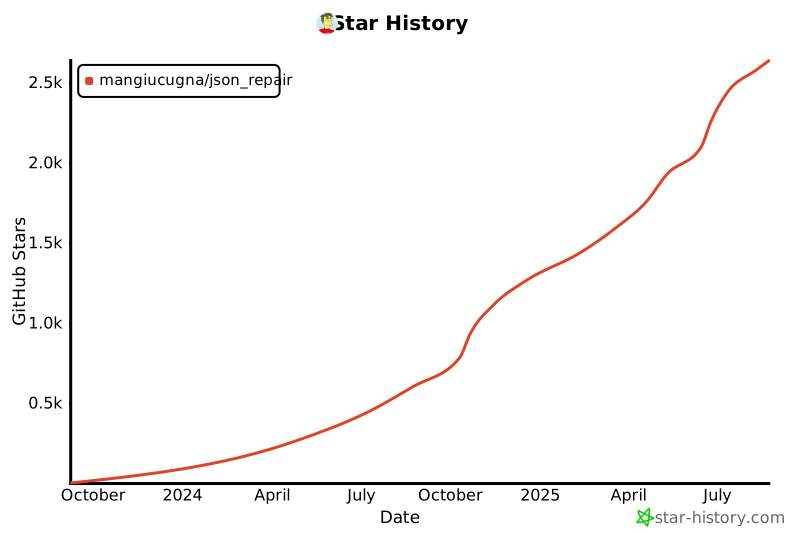](https://star-history.com/#mangiucugna/json_repair&Date)
|